

This feature is available on the Enterprise plan.
Overview
Single Sign-On (SSO) lets a user authenticate once, with a single set of credentials, across several related but independent systems. When SSO is enabled, your team signs in to Userpilot through your identity provider (IdP) instead of a separate Userpilot password. Userpilot’s SSO supports more than 12 identity providers across both SAML and OIDC, including Okta, Microsoft Entra ID (Azure AD), Google, OneLogin, and Ping. You connect your IdP once, and your team signs in securely from then on.Requirements
- An active Userpilot subscription on the Enterprise plan.
- An Account Owner role, or a role with the Manage SSO permission.
- A third-party identity provider, such as Okta, Microsoft Entra ID, or Google.
Where to configure SSO
All authentication settings are under Settings > Team > Authentication. From this page you can enable SSO, require SSO for everyone, and, once SSO is on, set up Just-in-Time provisioning and SCIM directory sync.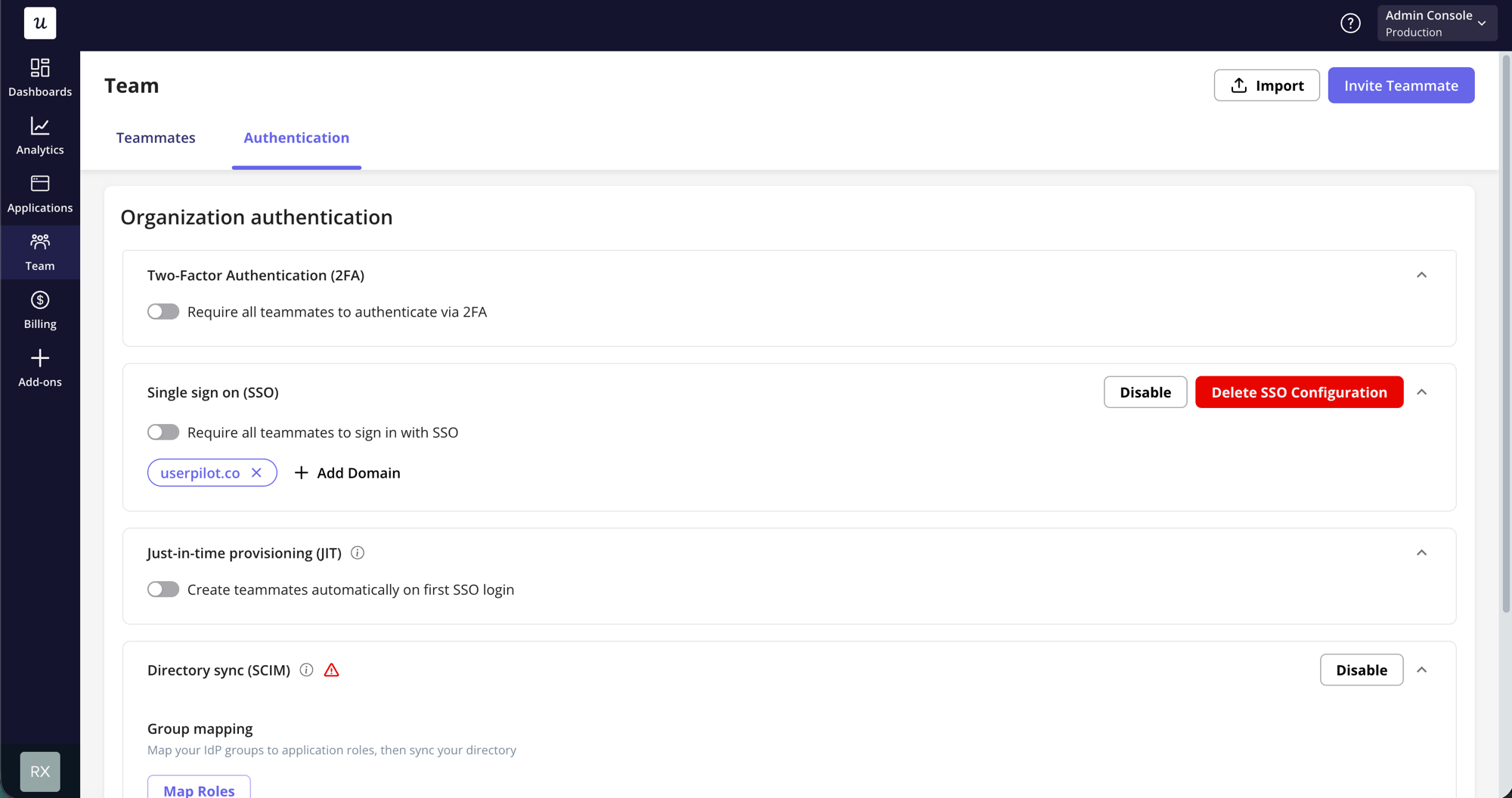
Enabling Single Sign-On
1
Open the Authentication page
Confirm you have an Account Owner role (or the Manage SSO permission), then go to Settings > Team > Authentication.
2
Start the SSO setup
In the Single sign on (SSO) card, click Enable. Userpilot opens the SSO setup portal in a new window.
3
Connect your identity provider
In the setup portal you will:
- Add and verify the email domains your team signs in with, such as
acme.com. Domain verification is what lets Userpilot route each teammate to the right IdP. - Choose your protocol (SAML or OIDC) and identity provider.
- Follow the provider-specific steps to finish the connection.
4
Confirm SSO is enabled
Once the connection is active, Userpilot marks SSO as enabled and stores your provider and connection type. The Authentication page shows Current SSO Provider with your connection.
You configure the actual IdP (Okta, Entra, and so on) in the setup portal, not inside Userpilot. Userpilot stores only the connection reference and never sees your users’ IdP passwords.
Signing in with SSO
Userpilot supports both sign-in started from Userpilot and sign-in started from your identity provider.1
From the Userpilot sign-in page
On Userpilot’s sign-on form, choose Continue with Enterprise SSO and enter your work email. Userpilot detects your domain, finds the matching connection, and redirects you to your IdP to authenticate.
2
From your identity provider
If your IdP shows a Userpilot tile (an IdP-initiated login), opening it signs you in directly. Newly created teammates land in your organization’s default application.
New teammates without an account yet. If a teammate does not have a Userpilot account, sign-in normally fails. They must first be invited, imported via CSV, or synced through SCIM. To create accounts automatically on first SSO login instead, enable Just-in-Time (JIT) provisioning.
Require SSO (SSO Mandatory Login)
You can make SSO the only way your team signs in. On the Single sign on (SSO) card, turn on Require all teammates to sign in with SSO. When enforcement is on:- Password login is disabled for everyone in the organization. Teammates who used a password must sign in with SSO from then on.
- Teammates created by SCIM or JIT are created without a password.
Disabling or deleting SSO
The Single sign on (SSO) card offers two actions:- Disable turns SSO off but keeps your SSO connection so you can re-enable it later. Disabling SSO also turns off JIT provisioning, because JIT only runs during SSO sign-in.
- Delete SSO Configuration removes the SSO connection entirely. JIT settings, including the default role, are cleared as well.
FAQs
Which identity providers are supported?
Which identity providers are supported?
Userpilot supports more than 12 providers across SAML and OIDC, including Okta, Microsoft Entra ID (Azure AD), Google, OneLogin, and Ping. You choose and configure your provider in the SSO setup portal.
Do I need SSO before setting up SCIM or JIT?
Do I need SSO before setting up SCIM or JIT?
Yes. Both SCIM directory sync and JIT provisioning build on SSO and require it to be enabled first.
What happens to passwords when SSO is enforced?
What happens to passwords when SSO is enforced?
Password login is disabled for the organization. If you later turn enforcement off, passwordless teammates receive an email with a link to set a password.